See It in Action
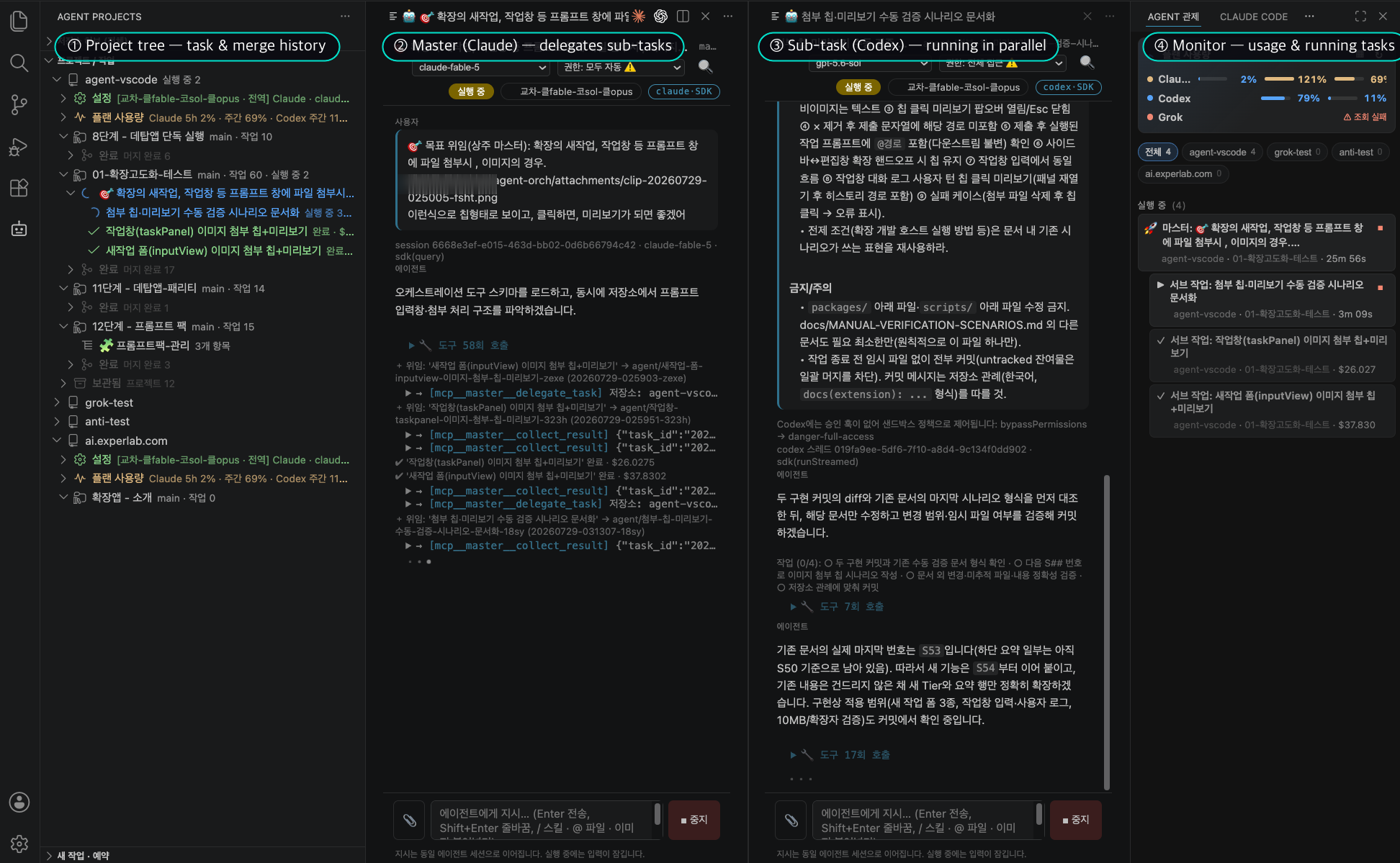
A master agent (Claude) decomposes the goal, sub-agents (Codex) implement in parallel, and the monitor panel on the right keeps everything in view — a real session.
Click the image to enlarge
Agent Orchestrator
Command a team of AI coding agents in parallel, from one window
Every task runs on its own isolated git worktree and branch. Delegate a big goal and a master agent breaks it into sub-tasks that run in parallel. From scheduled runs to verification and merge — an orchestration tool for operating a team of agents.
A master agent (Claude) decomposes the goal, sub-agents (Codex) implement in parallel, and the monitor panel on the right keeps everything in view — a real session.
Click the image to enlarge
Not a tool for driving one agent — a tool for operating a team of agents.
Every task gets its own git worktree and branch, created automatically. Whatever an agent changes, your main branch stays safe — review the diff and merge with one click.
Give a master agent a big goal; it decomposes it into sub-tasks and runs them in parallel with the sub-agents you choose. Monitor the master (left) and the delegation stack (right) in a single view.
Prompts, responses, tool runs, and completion banners are clearly separated, and you can keep instructing in the same session. Conversations are fully restored even after restarting VS Code.
Schedule a task for a specific time and the tree shows the remaining time. Pair it with the desktop app and scheduled tasks run in the background even when VS Code is closed.
When a sub-task finishes, a read-only verification session cross-checks the instructions, diff, and report, and returns pass/fail. A fail blocks auto-merge, keeping quality in check.
Run and monitor projects across multiple git repositories independently in a multi-root workspace — with different vendor profiles per repository, at the same time.
Bundle role prompts and extra rules into packs, and save run defaults, models, and permissions as profiles you can switch per repository.
The monitor view in the secondary sidebar aggregates running tasks and usage per repository, with concurrency caps to keep resources under control.
Execution, git changes, and scheduling only work in trusted workspaces. API keys are stored in VS Code SecretStorage, and file locks with a schedule ledger prevent duplicate runs.
From project creation to merge — five steps are all it takes.
Create a project from the 🤖 icon in the activity bar. If the folder isn't a git repository yet, onboarding walks you through git init.
Run a single task from one instruction, or delegate a big goal to a master agent for parallel decomposition.
Watch progress in chat-style panes and keep instructing. Delegated runs show master and subs in one view.
A verification agent judges completed tasks pass/fail against the instructions, diff, and report. (opt-in)
Review the diff and merge the task branch into the base branch. Delegated tasks support batch merge too.
All six vendors work in every role — standalone, master, and sub. Mix and match vendors per role.
| Vendor | Runs via | Roles |
|---|---|---|
| Claude | Claude Code CLI / SDK | StandaloneMasterSub |
| Codex | Codex CLI | StandaloneMasterSub |
| DeepSeek | Anthropic-compatible endpoint (reuses claude CLI) | StandaloneMasterSub |
| GLM | Anthropic-compatible endpoint (reuses claude CLI) | StandaloneMasterSub |
| Grok | grok CLI (streaming-json) / ACP | StandaloneMasterSub |
| Antigravity | agy CLI (stream-json) · OAuth — no API key needed | StandaloneMasterSub |
Each works fully on its own; together they give you 24/7 oversight.
The main stage for interactive runs, approvals, diffs, and merges
Always-on tray oversight + scheduled & background runs
The two programs share nothing but the filesystem inside your repository — no IPC, no server. Install either one and it works completely on its own.
Available now on the VS Code Marketplace.
Search for 100doo in the VS Code Extensions tab (⇧⌘X), or from the terminal:
Questions and feedback are always welcome.